
Archive
HSRP Configuration
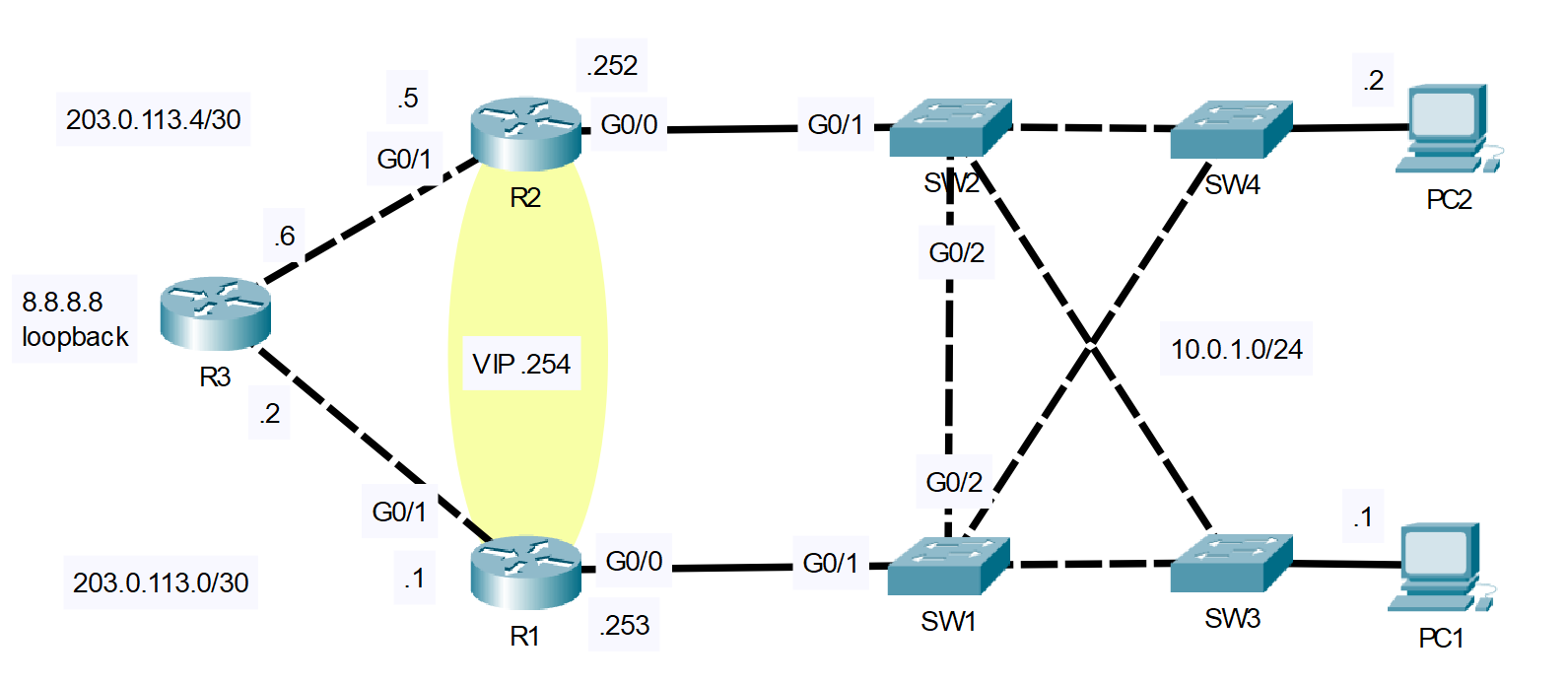
In this lab, we’ll configure HSRP on two Cisco routers. HSRP (Hot Standby Router Protocol) is a Cisco proprietary redundancy protocol used to establish a fault-tolerant default gateway in computer networking. Basically, multiple routers share a Virtual IP address (VIP). If there is a failure in one router, the other immediately and transparently takes over as the default gateway. You can follow along by downloading this HSRP Packet Tracer File and opening it in Cisco’s Free Packet Tracer Simulator (create a free account, enroll in one of the free courses and download the free software).
- Ping external server 8.8.8.8 from PC1/PC2.
- What is the default gateway configured as?
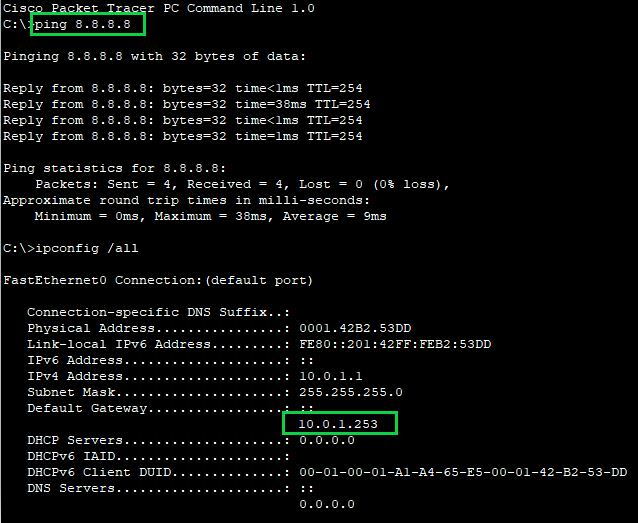
Currently both PC1 and PC2 are using 10.0.1.253 (R1) as their default gateway.
(8.8.8.8 is just a virtual loopback interface on R3)
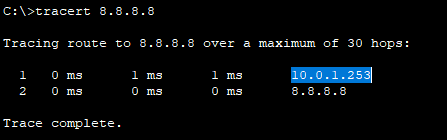
Let’s also run a traceroute from PC1 to 8.8.8.8 just to verify the ping does indeed pass through 10.0.1.253 (R1) on its way to 8.8.8.8 :
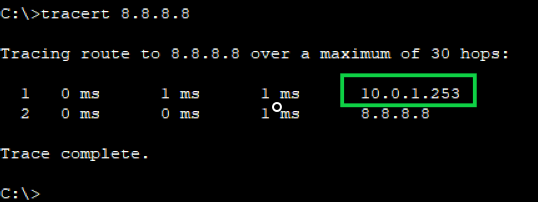
Yes it does pass through R1 on its way to 8.8.8.8 (R3).
- Configure HSRPv2 on R1/R2.
- Raise R1’s priority above the default (making R1 the Active router)
- Lower R2’s priority below the default (making R2 the Standby router).
- Enable preemption.
R1
R1#conf t
Enter configuration commands, one per line.  End with CNTL/Z.
R1(config)#int g0/0
R1(config-if)#standby version 2
R1(config-if)#
R1(config-if)#standby ?
  <0-4095>  group number
  ip        Enable HSRP and set the virtual IP address
  ipv6      Enable HSRP IPv6
  preempt   Overthrow lower priority Active routers
  priority  Priority level
  timers    Hello and hold timers
  track     Priority Tracking
  version   HSRP version

R1(config-if)#standby 1 ip 10.0.1.254
%HSRP-6-STATECHANGE: GigabitEthernet0/0 Grp 1 state Init -> Init

R1(config-if)#standby 1 priority 200
%HSRP-6-STATECHANGE: GigabitEthernet0/0 Grp 1 state Speak -> Standby

%HSRP-6-STATECHANGE: GigabitEthernet0/0 Grp 1 state Standby -> Active

R1(config-if)#standby 1 preempt
NOTE: The HSRP version number MUST match on BOTH routers involved in the HSRP configuration. If we were not to change R2 to HSRP version 2, we would receive “DUPLICATE ADDRESS 10.0.1.254” error messages. Both routers think they are the Active router if there is a version mismatch. In Packet Tracer, the HSRP version defaults to version 1.
R2
R2(config)#int g0/0
R2(config-if)#standby version 2
R2(config-if)#standby 1 ip 10.0.1.254
R2(config-if)#
%HSRP-6-STATECHANGE: GigabitEthernet0/0 Grp 1 state Init -> Init

R2(config-if)#standby 1 priority 50
R2(config-if)#
%HSRP-6-STATECHANGE: GigabitEthernet0/0 Grp 1 state Speak -> Standby
So, we just configured R2 with the exact same configuration, but with the lower priority of 50.
This ensures R1 will be the Active router. Now let’s verify what we just configured:
R2(config-if)#do show standby
GigabitEthernet0/0 - Group 1 (version 2)
  State is Standby
    5 state changes, last state change 00:02:14
  Virtual IP address is 10.0.1.254
  Active virtual MAC address is 0000.0C9F.F001
    Local virtual MAC address is 0000.0C9F.F001 (v2 default)
  Hello time 3 sec, hold time 10 sec
    Next hello sent in 1.818 secs
  Preemption disabled
  Active router is 10.0.1.253
  Standby router is local
  Priority 50 (configured 50)
  Group name is hsrp-Gig0/0-1 (default)
Notice the highlights above:
– R2 is the Standby router
– The Active router is 10.0.1.253 (R1)
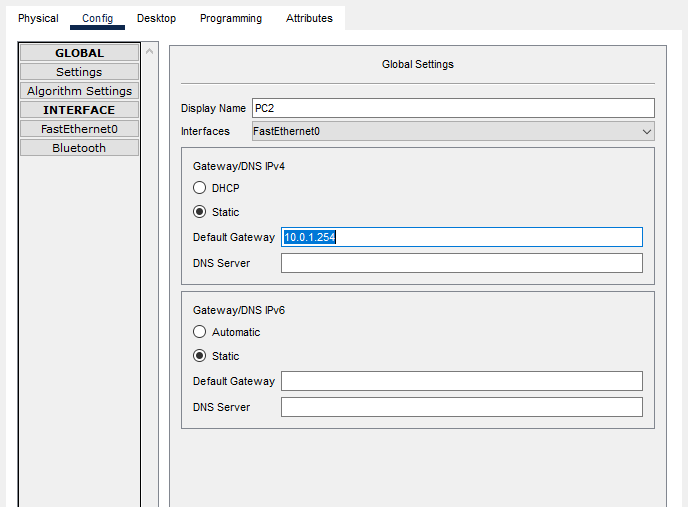
- Configure the VIP as the default gateway of PC1/PC2.
- Ping 8.8.8.8 from the PCs. Check the PCs’ ARP table.
- What MAC address is mapped to the VIP?
Click on both PCs > Config Tab > In the Default Gateway enter 10.0.1.254
Now ping 8.8.8.8 from one of the PCs:
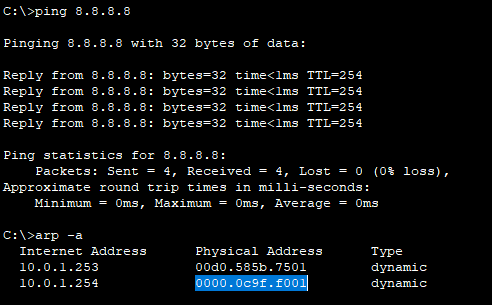
The ping works. Now check the PCs arp table with the arp -a command.
Notice the HSRP version 2 virtual MAC address highlighted in blue.
Next issue a traceroute to 8.8.8.8 and notice that the first hop is NOT the virtual gateway by R1s G0/0 interface.
The traceroute tool is useful to verify that the correct Active router is being used:
- Turn off R1 (save the config first!).
- Ping from PC1 to 8.8.8.8 again.
- Is R2 used as the default gateway?
Go to R1 and save the configuration using the write command from privileged exec mode:
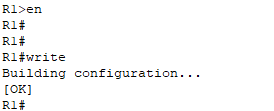
Make sure you save the config before restarting R1, because all of the configuration we’ve done will be erased!
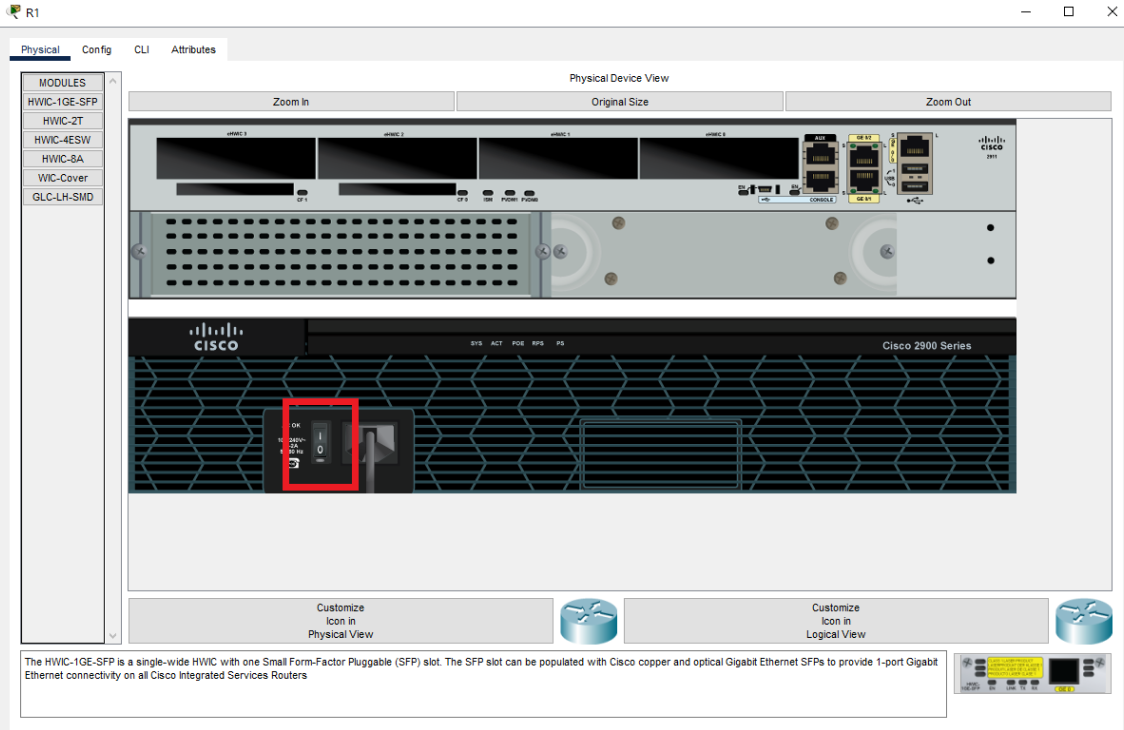
Press the Power button in R1s Physical Tab:
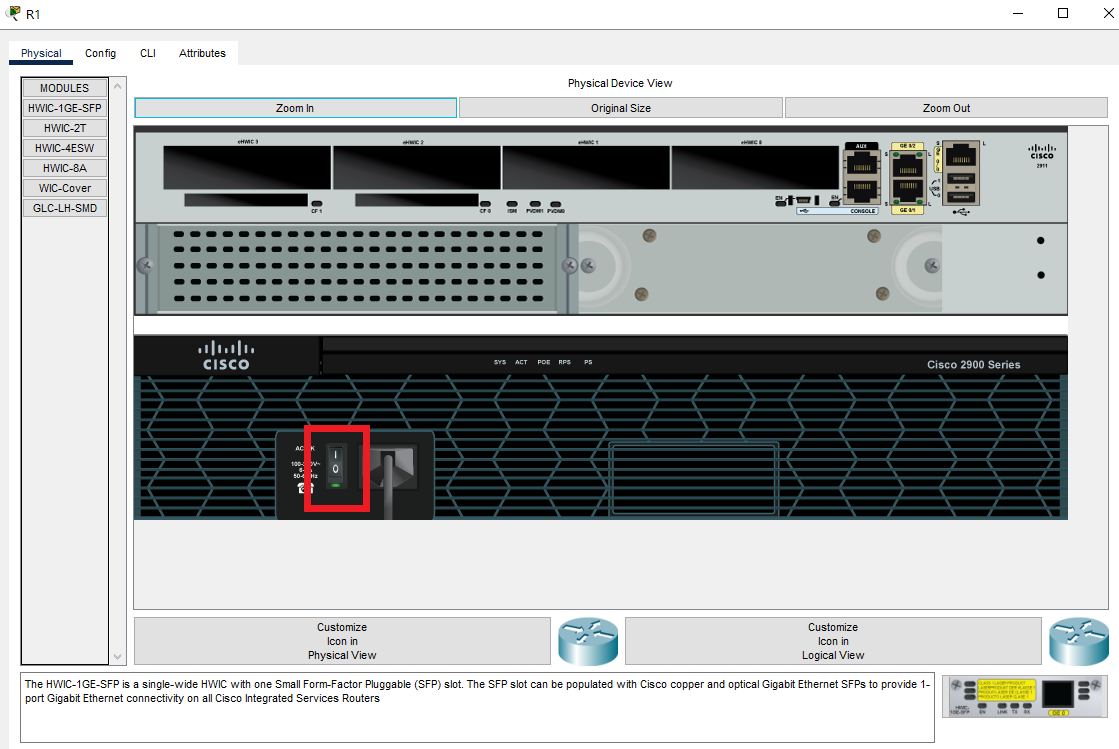
Ping from PC1 to 8.8.8.8 again, followed by a traceroute:
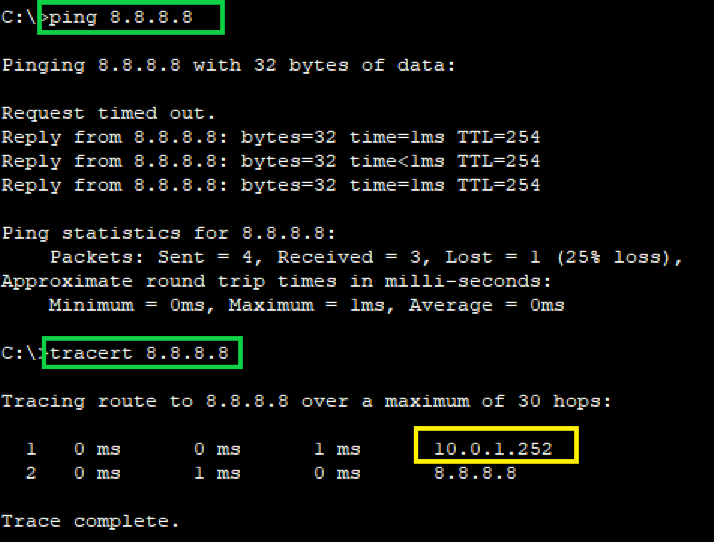
The ping still works to R3s loopback interface 8.8.8.8 and the traceroute shows that R2 has taken over the responsibility of Default Gateway (Active router).
- Turn on R1 again.
- Ping from PC1 to 8.8.8.8 again.
- Does R1 become the active router again?
Ping from PC1 to 8.8.8.8 again, followed by a traceroute:
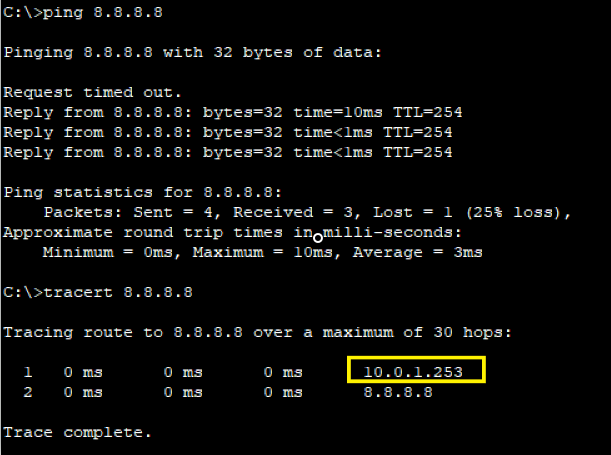
As shown above in the traceroute, when R1 comes back online it takes back the Active router role and is the Default Gateway again. How is this so?
Because earlier we gave it a higher priority than R2 and we enabled preemption:
R1(config-if)#standby 1 priority 200
R1(config-if)#standby 1 preempt
- Purpose of Preemption:
- HSRP preemption allows a standby router with a higher priority to immediately become the active router in an HSRP group.
- By default, when the active router goes down, the standby router with the highest priority takes over as the active router.
- How It Works:
- When a router with a higher priority becomes available, it sends a “Coup” message to the network.
- The lower-priority active router receives this message and transitions to the “Speak” state.
- The active router then sends a “resign” message, signaling its readiness to relinquish the active role.
- The router with higher priority assumes the active role immediately.